
 lumiya.com.tr
A healthy balance with screens
Video Game Rules for Kids: Screen Time and Healthy Gaming (Ages 6–18)
Ending game time mid-match creates unnecessary conflict. Here is how to plan exits around rounds, set parental controls on devices, and protect kids from unwanted purchases and chats.
General Information: General information only; it may vary from child to child. Talk to your doctor or a specialist before making decisions.
In short
- Games end according to match rounds or save checkpoints rather than household clocks; timing departures to the end of a round prevents most disputes.
- Daily limits belong in console and phone parental settings rather than verbal reminders that require daily negotiation.
- Game ratings on store pages and boxes reveal content flags like microtransactions and online interactions.
- Voice chat and in-game currency purchases must be locked separately behind a parental passcode.
Lumiya Editorial TeamBased on 3 sourcesOur editorial standards
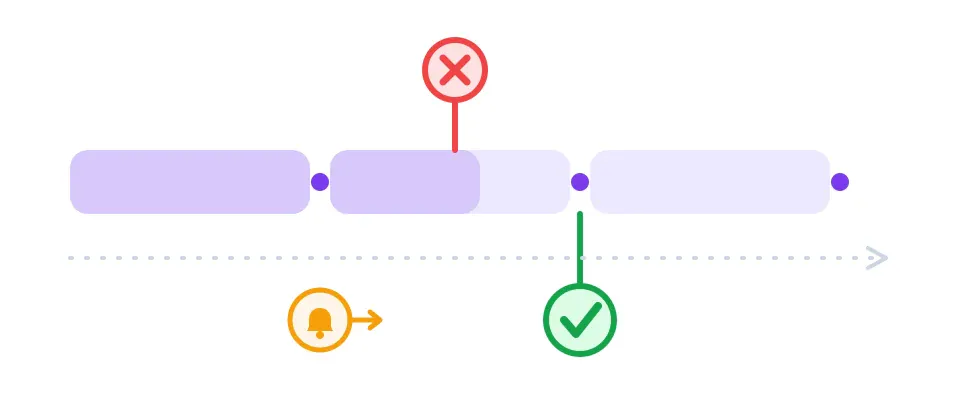
“The round is not over yet!” That single sentence starts the same evening argument in millions of households. Children rarely resist out of stubborn defiance alone: multiplayer games run on internal match timers, and abandoning a session mid-fight penalizes the entire squad. Scheduling departures at round boundaries, enforcing hardware-level timers, and locking down voice chat dissolves the friction.
Why demanding “turn it off right now” backfires
Most competitive and cooperative video games unfold across distinct rounds, matches, or missions. When an adult suddenly unplugs the power or demands an immediate shutdown, the player incurs in-game ranking penalties, temporary matchmaking suspensions, or the loss of uncommitted progress. Asking for “just two more minutes” is often an effort to finish a match cleanly rather than open defiance.
The practical solution is aligning household expectations with the software's structural breaks. Agree on an explicit round count before launching the game, provide a calm verbal check-in when one round remains, and designate the final whistle as the hard exit point. For narrative single-player titles, link stopping points to manual save checkpoints so your child never loses saved progress.
Configure timers inside device settings, not through verbal debates
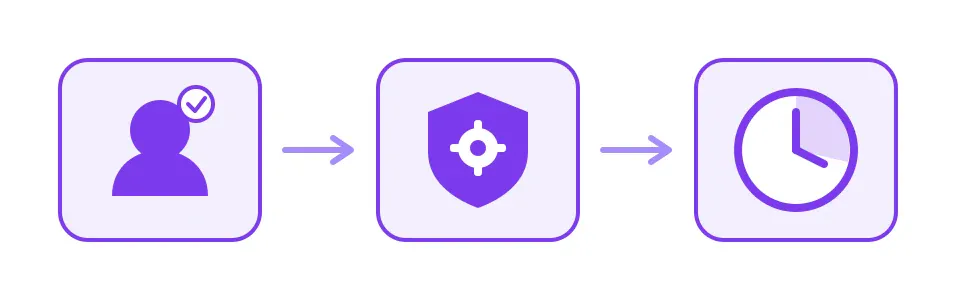
Verbal deadlines invite endless debate each evening; automated device limits enforce themselves quietly. A clean setup moves through three sequential gates: establishing a dedicated child account, activating family safety controls, and defining daily playtime quotas.
Five steps to configure household gaming limits
-
Create an independent child account
If children log in under a parent profile, no safety filter works. Register a dedicated child account on your console or tablet with the correct birthdate.
-
Enable console parental tools
On PlayStation use Family Management, on Xbox open the Xbox Family Settings app, and on Nintendo Switch link the Parental Controls mobile app to set daily playtime and bedtime locks.
-
Lock platform-specific accounts
Environments like Roblox feature their own internal privacy PINs and account restrictions that operating system limits do not automatically catch.
-
Mirror limits on phones and tablets
Use Apple Screen Time on iOS or Google Family Link on Android to restrict mobile game apps so rules do not disappear when moving between screens.
-
Display house rules visibly
Post agreed weekday and weekend hours on the refrigerator. When physical schedules match automated system shutoffs, children internalize the boundary without personal resentment.
Reading age rating labels: what ratings truly mean
Age rating labels appear on physical game packaging and digital store storefronts. They communicate far more than a simple age recommendation; accompanying descriptor icons specify whether a title features stylized violence, gambling mechanics, or open multiplayer chat. In North America, the ESRB framework guides family purchases, whereas European releases rely on the PEGI rating system.
| Rating System | Where displayed | Key indications | Legal standing |
|---|---|---|---|
| ESRB | North American retail boxes and digital stores | E, E10+, T, M, AO + interactive elements | Industry voluntary standard |
| PEGI | European releases and global digital platforms | 3, 7, 12, 16, 18 + content descriptor icons | Advisory in most states |
| USK | German retail software | 0, 6, 12, 16, 18 years | Legally binding in Germany |
| Content tags | Alongside rating badges | Microtransactions, violence, crude humor, online chat | Informational advisory |
Look closely at the interactive elements beneath the letter grade: two titles rated Everyone 10+ may offer vastly different experiences if one includes unmoderated voice communications with strangers while the other operates entirely offline.
Lock down microtransactions and voice channels separately
Setting an hour limit does not protect family finances or insulate children from contact with online strangers; those protections require dedicated privacy switches that ship enabled by default.
- Remove saved debit and credit card details from child profiles; authorize pocket money using fixed-amount prepaid gift cards.
- Require a parental passcode or account password for every single digital checkout; never check the “remember password” box.
- Restrict voice and text channels to confirmed real-world friends; disable open team chat entirely for younger players.
- Turn on friend request approval notifications so strangers cannot add your child without your explicit knowledge.
- Walk your child through the reporting and mute buttons inside their favorite games so they know how to block harassers immediately.
Explore broader digital media habits across our comprehensive digital life and safety section.
Who sets the rules: ages 6–9, 9–12, and 12–18
Between 6 and 9 years old, the parent retains total administrative control. You select installed games, keep multiplayer voice communication turned off, and program automated timers directly into the hardware so rules remain firm and non-negotiable.
Between 9 and 12 years old, rules become collaborative contracts. Pre-teens value online social games with schoolmates; invite them to help construct the weekly timetable, restrict online gaming friends strictly to real-life classmates, and hold a brief weekly check-in. Explore key milestones for this age in our ages 9–12 section.
Between 12 and 18 years old, outright bans surrender to structured autonomy. Tie gaming privileges to sleep schedules, high school academic responsibilities, and offline commitments; broader adolescent screen habits are examined in our dedicated ages 12–18 guide.
When gaming requires a pediatrician or specialist evaluation
Occasional grumbling when turning off a video game does not mean a child is addicted. A clinical concern arises only when digital play systematically dismantles normal developmental routines.
Gaming disorder is characterized by impaired control over gaming, increasing priority given to gaming over other activities to the extent that gaming takes precedence over other interests, and continuation despite negative consequences.
| Typical behavior | Warning sign — seek evaluation |
|---|---|
| Sighs or grumbles for a few minutes after shutting down | Explosive aggression, panic, or property destruction upon console shutdown |
| Asks for extra time on weekend afternoons | Routinely plays through the night and cannot wake up for morning classes |
| Procrastinates on homework occasionally | Sustained collapse in grades and frequent school absences over several months |
| Plays cooperatively with known school friends | Completely abandons sports, outdoor hobbies, and face-to-face friendships |
| Gets excited about upcoming game releases | Exhibits constant restlessness, irritability, and fixation when away from screens |
The World Health Organization defines gaming disorder through three diagnostic markers: impaired control over gaming, increasing priority given to gaming over other life interests and daily activities, and continuation or escalation of gaming despite negative consequences. To warrant clinical diagnosis, this pattern must persist for at least 12 months and cause severe impairment in personal, family, social, or educational functioning. In the United States, the American Academy of Pediatrics recommends establishing a structured Family Media Plan; families concerned about escalating behavioral symptoms should consult their pediatrician, school counselor, or dial 988 for specialized mental health guidance.
General Information: This content offers general information based on expert sources. Every child, family and situation is different, so what is described here may vary from person to person. Talk to your doctor or a qualified specialist before making decisions about your child.
Was this article helpful?
This topic at other agesDigital Life & Safety
Tools for this Age
- Baby and child sleep scheduleHow much should your child sleep in 24 hours, and when should bedtime be? Calculate it from official guidance and compare it with your own log.
- Screen time by ageSee how much screen time a day your country's official body recommends at your child's age; add daily use to compare it with the advice.
- Child Height Predictor & Genetic Target Height CalculatorHow tall will your child be as an adult? Enter both parents' heights to calculate the pediatric mid-parental target height and expected adult height range using the Tanner and AAP formulas.
- What temperature is a fever in children?See whether the temperature you measured counts as a fever according to your country's official health source, when to get help at your child's age and the warning signs.
Checklist
Popular Topics
Frequently Asked Questions
- 1
- 2
- 3
- 4
Editorial Note
This article provides general guidance; every child's gaming pattern and family routine is different. Consult your pediatrician or family physician if gaming disrupts sleep, school performance, or peer relationships.